
These days, you’re nobody without a social media account. It doesn’t matter if it’s your grandma’s cookie business or a local band who hasn’t released a song in years: you’ll find them on Facebook. So it goes without saying that your ecommerce store needs to be integrated on social media too.
In this article, we’ll discuss how social media can help you with your success. We’ll tap into the different ways of how to make good use of the different channels and we’ll explain how you can take full advantage of the platforms in order to see your efforts pay off.
Integrating your social media networks with your ecommerce store will help you drive more traffic and generate more sales. And with the use of social media growing each year, you know it’s time to give your social media marketing a little boost! Let’s discuss how.
The first use of social media that can be highly important for your ecommerce store, is driving traffic to your business. Social media is ideal for introducing your brand to the world, attracting new customers, showing your products and collecting positive reviews. It’s the platform where you reach out to your audience and engage in conversations with them.

The Iconic promotes their new items on Facebook in order to drive traffic to their website
There are different ways of driving traffic to your online store through social media presence. You can either let organic posts do their charm in order for people to get to know your brand. Or you can invest some money in ads and discover a whole new world of potential customers. Let’s have a look at both.
The first way doesn’t cost you any money, but it will cost you some more time (we know, time is money too). Nevertheless, will the effort you put into driving organic traffic from your social media account to your website result in longer-term benefits. And to get this organic traffic, you’ll have to focus on quality social media content.
Creating valuable content for your social media channels is a great way to reach your audience. This can be content of all sorts and forms, ranging from awesome how-to articles to in-depth video guides. You can even work with a funny infographic or an inspirational quote.
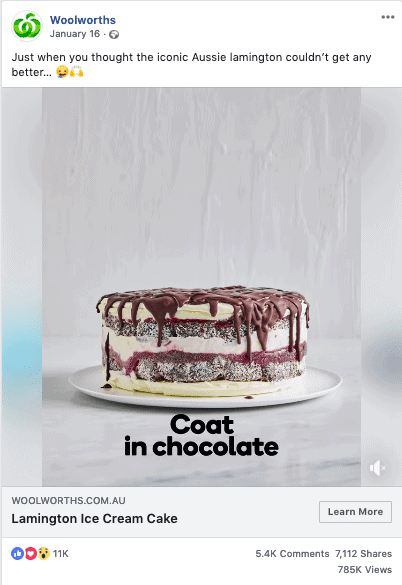
Woolworths uses a recipe to drive traffic to their famous Lamington cake
It doesn’t matter what content you create, if it’s good, people will interact with it. This can be in liking, commenting or sharing your content – which will make it visible for a broader audience. It will help you get your brand known with new customers, but it will also get back on top of your existing customer’s mind.
Another way to increase traffic to your ecommerce business is by spending some money on social media advertising. Even though you might be a bit reluctant towards spending parts of your marketing budget on ads, it will be worth the investment. Ads on social media offer you the opportunity to work with a highly targeted audience, where you can reach the exact right people at the right moment.

Cela promotes their phone cases through sponsored posts
There are different ways that social media advertising will be able to support your online shop. You can, for example, introduce your company to the world, by working with brand awareness ads that show your unique selling propositions so people find their way to your website. Alternatively, you can advertise different products in your shop, which will bring interested buyers directly to the right products they’re interested in. Thirdly, you can retarget website visitors that have already shown interest in certain items, reminding them of your products and giving them the little push they need.
A second important part of social media is your customer retention, where you maintain the relationship you have with both new and existing customers. By being present on social media, you hang out where your customers are too. It gives you the option to integrate your brand into your customers’ conversation, making it a lot easier for them to reach out to you and trust you.
A good example is customer service, which has been a lot more approachable now it’s mostly done on social media. Picking up the phone and being on hold for hours, used to be a good reason to not reach out to a certain company – but sending a message on Facebook or Tweeting to them is a lot easier. Make sure you listen to your customers on the platforms where they are trying to reach you. If they have inquires about their order, the size or shipping status, you have to make sure you can help them out in a fast and easy way.

Another advantage that social media offers to both businesses and their customers are online reviews. Online reviews have basically replaced word of mouth recommendations, making them more important than ever to attract new customers. There are a lot of platforms where people can leave their opinion, but social media remains a favourite. Work on collecting those reviews by sending out emails asking people for one, and make sure to comment on them once you’ve received them.
In line with your customer service is the instant messaging feature. It’s never been easier for people to get in touch with their favourite brands, so it’s up to you to keep that ease. People can reach out to you for a number of reasons and you should be prepared to be at the other end of that line. If you don’t have the means to have a full team permanently present, ensure to install automated responses and address the matter as soon as you’re available.

Dan Murphy’s has a personal approach to engage customers to get in touch with them
One last way to keep your customers engaged (and potentially drive traffic to your website) are the live videos and stories various social media platforms offer these days. On Facebook, you can go live with your company and consumer are getting more fond of this type of content. 82% of the people even prefer watching a live video over reading a full blog post. Live streaming is not only a great tool for publicity but can also lead to higher conversion rates. Think of introducing new collections, Q&A’s or giving tutorials on how to use your products.
Another tool that Facebook, Snapchat and Instagram offer are stories. Customer loves this type of content since it’s fast, honest and interactive. They are a great way of encouraging people to send a direct message. Stories can also help you collect data about customers through a simple poll. Working with stories can help you in promoting your items or giving customers a peek behind the scenes. Both of these more personal approaches to integrate social media and will make them feel more connected to your brand.

Social media doesn’t only help you drive traffic but also helps you to sell directly to your customers. The reason we didn’t make this chapter the first of our article is that people have to be ready to buy. That’s why we recommend focusing on your brand awareness and loyalty first. But when the time is right, social media is the platform to turn your leads into conversions.
Facebook offers a Facebook store, where your customers can directly buy your items without having to leave the social platform. You can upload your products to the Facebook store manually. Alternatively, you can work with integrations that will automate this process for you. Once you have set up your Facebook store, you can tag your products in different posts. The Facebook store is also used to create Dynamic Products ads to reach a targeted audience.
On Instagram, you can tag products in your posts through Instagram shopping. This feature will highlight the products that are for sale, offering customers more information when clicking on them. To make the purchase, customers will have to click through to your website. Alternatively, you can install links in your stories, where people have to swipe up to get to the right page.

Myer makes good use of the Instagram Shopping feature by tagging their products in the posts Integrate Social Media
One last way how social media can help your ecommerce store grow is through influencer marketing and user-generated content. Both are a good way of generating brand awareness and creating engagement, giving your online store the attention it deserves.
By focusing on influencer marketing you let a celebrity endorse your products or your brand. These ambassadors can use their own social media pages to promote certain items. By sharing these items with their followers they will create a relationship of trust with their own audience.

Australian influencer Lauren Bullen helps promote Hairbust products to Integrate Social Media
Another good tactic for your social media strategy is user-generated content. This means you will use images, videos or product reviews of your customers’ to promote your own brand. And by letting a third party speak for you, you will not only create more engagement but also gain more trust.
Building a consistent brand for your company should be one of your company’s most important KPIs. Companies with a strong brand have a deeper emotional connection with their customers and have the advantage of differentiating themselves from their competitors. Branding for your ecommerce webshop is important.
With already more than 50% of internet users having bought products online, our shopping behaviour is turning more digital. And with consumers looking for their products online, online stores are rising from everywhere.
Running an ecommerce store has never been easier. With ready-to-use templates and dropshipping delivery, you don’t even have to invest much to earn your money with it. It comes as no surprise that there are thousands of ecommerce websites online, that all offer more or less the same items.
And that’s where good branding comes in. Branding gives you the opportunity to not just be another ‘dropshipping technology company’, but to be a ‘fun company that offers affordable technology for students’. Do you see where we’re going with this?
Branding your ecommerce store is an important step in order for your shop to grow. Here are a few tips to build a strong and consistent ecommerce store that will have positive effects on your yearly turnover.
In order to position yourself as a unique ecommerce store, you need to figure out what makes you unique. You need to be solving a unique need for your customers, or people won’t care about you. That’s why your brand building should start with discovering your Unique Selling Propositions (USP).
Finding your USPs requires a good understanding of your target market, competition and industry. Start with defining your mission and vision. You need to find what your business is really good at, and determine how you can make a change for your customers that other companies can’t.
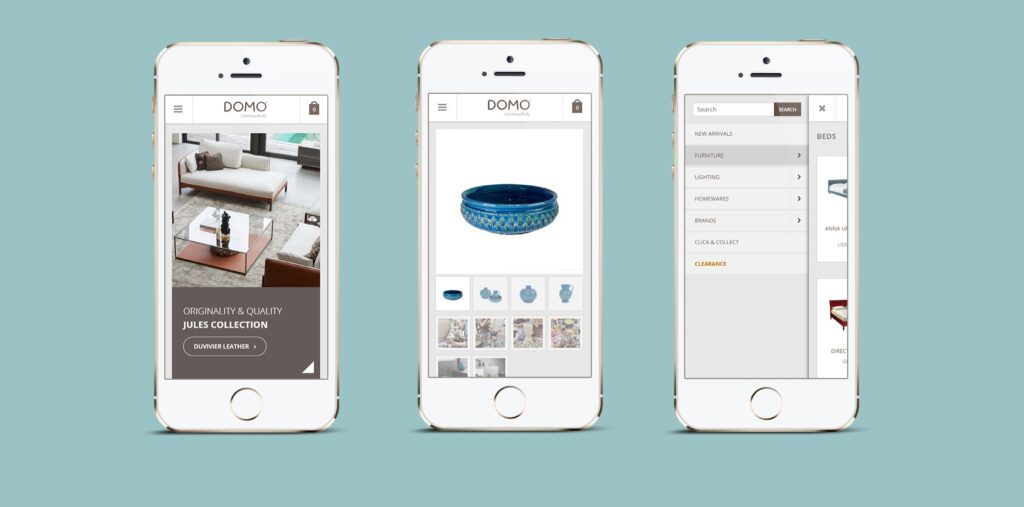
In addition to your USPs, that make your company unique, you’ll also need visual elements to stand out from your competitors. This means you’ll need a logo, name, tagline and other branding elements – so people will recognize your company all over the web. Branding colours are another thing to think about since they can evoke different feelings with your company if used correctly. Make sure to choose a platform that offers customizable branding, like WooCommerce.
The design of your ecommerce store is highly important. A beautiful design with a strong focus on user experience will help you beat the competition. Move away from templates but hire an ecommerce web designer. They will not only be able to help you with the design of your website but can also help you with integrations and marketing that really fit your company.
A strong brand will connect with its audience. You should always put the wants and needs of your customer in the first place, and every action should be taken with this in mind. In the end, you built your business for them – so you want to know who they are.
A good way of understanding your customers is to look at your data and see what types of customers you’re dealing with. You will probably discover trends such as loyal customers and first-time customers. Or maybe you’ll even discover what products your customers are sticking around for. It’s important to use this data in order to retain these customers (by sending out promotional emails or installing ads for example). Additionally, it will help you make adjustments on your website and stock based on what works and what not.
Alternatively, you’ll also find a group of customers who have viewed your products but haven’t purchased, or who have left products in a shopping cart. These customers too deserve some special attention and sending them a little reminder. A shopping cart reminder will not only help with brand recognition but will also nurture the relationship they have with your brand.

Once you have created a brand for your ecommerce webshop, it’s important to expose your customers to it on every possible channel. By creating a consistent branding image on every medium, you can integrate your brand with your omnichannel marketing strategy. This way, you can offer a seamless experience that results in higher brand recognition. This means your brand should be represented outside of your website too. Think, for example, of branding in your emails – both newsletter as transactional emails – or branding on your social media channels.
Branding also continues offline. You can even include branding when sending the products to your customers. Think of the packaging you offer or even try to create a special unboxing experience that will give your customers a memorable experience they won’t forget.
Web development is complicated in any project. Especially so for ecommerce web development. You have to consider different aspects such as web design, usability and performance in order for your website to look and function well. The development of your custom website is, however, the backbone of all your further operational and marketing efforts. Think for example of how a good web development leads to better SEO results, how a functional website increases a good user experience or how different content management systems can make your daily life easier.
So there’s no doubt that you should put some thought into the development of your company’s website. Especially when it comes to ecommerce web development, there are various other factors that will only make the web development process trickier. A complex website, like an online shop, will not only offer challenges when it comes to the structure of the website or its design but also regarding your stock inventory and payment processes.
We know there’s a lot involved when we talk about ecommerce web development. It often gets technical and the developer’s jargon might leave you with your head whirling. We would like to help you understand the basics of web development when it comes to ecommerce. That’s why we created this handy guide that focuses on different aspects of the process, so you know what to look out for. We will talk you through the development processes of ecommerce stores and what you should be focusing on in 2019.
Let’s start easy. E-commerce refers to buying and selling goods using the internet. We probably don’t have to tell you how popular online shopping became the recent years, but we’d still like to show you this graph – just in case.
With more and more people buying online, it shouldn’t come as a surprise that there are millions of ecommerce websites online for people to choose from. Differentiating yourself from your competitors becomes increasingly important and this all starts with having a strong and well-developed online webshop.
There are different types of ecommerce models, such as B2B or B2C, and different types of stores (think of drop shipping, wholesale, retail etc.) But one thing all these stores have in common is that they’re unmanned, meaning nobody helps you browse through the products or sits at the counter to complete your transactions.
Since there are no physical employees present in the store, your ecommerce website should focus on all these tasks. And with your website taking over, you need a website you can trust. Let’s have a look at the web development process of ecommerce stores and the different aspects that come with it.
So you have an idea, you have your products (whether or not you have a physical stock), and now you need a platform to sell your goods on. A custom webshop is most likely what you’re thinking of – although alternatives could include selling your products on Amazon or Ebay. But for the sake of this guide, we’re going to build a custom webshop, where you can show your products in all their glory.
Let’s look at the basic things we would need in order to build an online store:
This is a non-exhaustive list of things to consider when you start building a webshop. Luckily, there are many platforms these days that offer you an easy approach to all the technical stuff. Those platforms allow you to upload your products, keep track of your stock and with some easy drag-and-drop work you can design your pages. They connect your CRM and even send out automated emails.
And don’t get us wrong, we love these platforms. Even better, we use them ourselves (we’ll tell you which one later on). But it’s important to consider the limitations too. However they are very easy to use, there are still a lot of functionalities that will require more advanced knowledge of web development. And by just using an off-the-shelf web solution, you might not be so different from your competitor. An ecommerce web developer, however, will know all the integrations and functionalities you need to not only build a custom website that exactly fits your brand, but they will also help you increase your sales funnel conversion rate.
So we mentioned it already: we are not going to reinvent the wheel. There are brilliant platforms on the market that offer a great tool to build an ecommerce website, so we would be stupid not to make use of it. Our preference goes to WooCommerce, the WordPress plugin that is specialised in ecommerce.
We don’t want to claim it’s the best platform, but it fits our needs best. It gives us a lot of options and freedom to create the exact products we want and it has proven to be successful. We’ll give you a couple of reasons why we love WooCommerce, but feel free to do your research and make up your own mind!
WooCommerce is a WordPress plugin that adds ecommerce functionality to your WordPress website. It’s easy to install and set-up and can be integrated with your WordPress theme. It gives you full control over all your data, which means it’s reliable – even if something would go wrong with the platform itself.
WooCommerce also offers you complete control over your products. You can decide on product types, quantity and variations yourself. And with its inventory management system, you can take full control over stock, back orders and product management. When it comes to payments, WooCommerce has fully customisable check-out processes and payment gateways that you can choose from.
Furthermore, WooCommerce has a lot of extensions, plugins and integrations available, so you can customise your shop entirely to fit with your own ecommerce brand. That’s enough for us to make it our go-to platform for building beautiful and functional webshops – and it’s the reason we’ll focus on WooCommerce in the rest of this guide if we want to get a bit more specific when it comes to certain features.
When developing an ecommerce website, your product catalogue will be at the heart of many decisions. That’s why we need to ask ourselves a couple of questions regarding our products. For starters, you should look at the products you are going to sell. This varies a lot depending on the type of store and your business model. You might be selling your own creations, which means you are limited to what you have, or you might be selling your goods from a wholesaler.
In the last case, you should think about your niche and potential customers, and see what product variants or related products they would benefit from so you can extend your product range. Same goes for different types, colours or sizes, where you need to make decisions to see what you’re going to offer and what not.
You should also think about your stock inventory. Are you going to buy the products and store them at a location or do you work with dropshipping delivery? You might want to set up an affiliate ecommerce store, where you don’t actually need any products at all. Your stock is normally controlled by a system that will notify you when you’re running low. But it’s up to you to make decisions if you want to offer it again and to figure out how long it will take for the product to be delivered.
So we have our product catalogue and we have our platform. Let’s have a look now at how we can blow life into this online shop. And the best way to start is by organising things. Your information architecture is an important step for the user experience (UX) on your website and it will give you a lot of direction when developing your site.
So what does this entail? You’re basically going to collect all the information that you want to include in your ecommerce store, and then categorise it into different groups. By doing this, you will get a clear overview of how you can divide the pages, what information goes on these pages and what product categories you will have. Not only your product catalogue will benefit from this, but it will also help you when creating navigation menus and deciding upon URLs.
Let’s clarify things with an example. Let’s say you want to sell sports equipment online. You could decide to categorise your products by sport, for example, creating categories like rugby, tennis and basketball. A second division would be to split the categories in equipment (like balls, nets etc.) and clothing (which can be split into male and female). These categories will probably be present in your menu, giving users the chance to quickly find what they’re looking for. It will also help your users when they’re using the search function on your website, looking for tennis balls for example. And finally, a good website structure with URLs like mystore.com.au/tennis/clothing/female will get you better SEO results.
In addition to your different product categories, you should also decide on other information you want to include on your webshop. Maybe you want to write educational blog posts about sports, that you can put under a blog section with different categories. You might want to include a page about your shipping & return policy, or maybe you need some extra space to include details about your products. Don’t forget to think about standard pages like an ‘About Us’ page for your brand story and a contact page for customers to get in touch.
Once you have the main layout of how you’re going to categorise your products and ideas, it’s time to look at the pages itself. You can decide what type of information you’d like to include on the home page, what details are needed for the different products, where your logo goes and where you add your crucial business information. Of course, you don’t need to know every exact detail (leave some work for the designers) – but it helps a lot to start with a good organisation of your information.
By now it should be clear how much information or content your website will contain. And to display, create, publish and maintain all that content you need a good Content Management System (CMS). A CMS is a tool that you will use to enter and maintain all your data and files, that is easily accessible without having to go into the website’s code. An example of a CMS system is WordPress.
A big advantage of a CMS system is that is separated from your design. This means you can enter text, place an image or update a price in the CMS and it will appear on your website in the right style. This gives you a basic framework where you can modify each element of your website, without having to worry about more technical issues. Another plus is that a CMS helps with your SEO, where all the right tags are automatically applied and you have the option to enter meta tags and alt tags in the CMS directly.
In the case of an ecommerce store, your main type of content will most likely be your products for sale. With the WooCommerce plugin, you have a CMS that gives you the option to enter all the product details, such as attributes or its status.
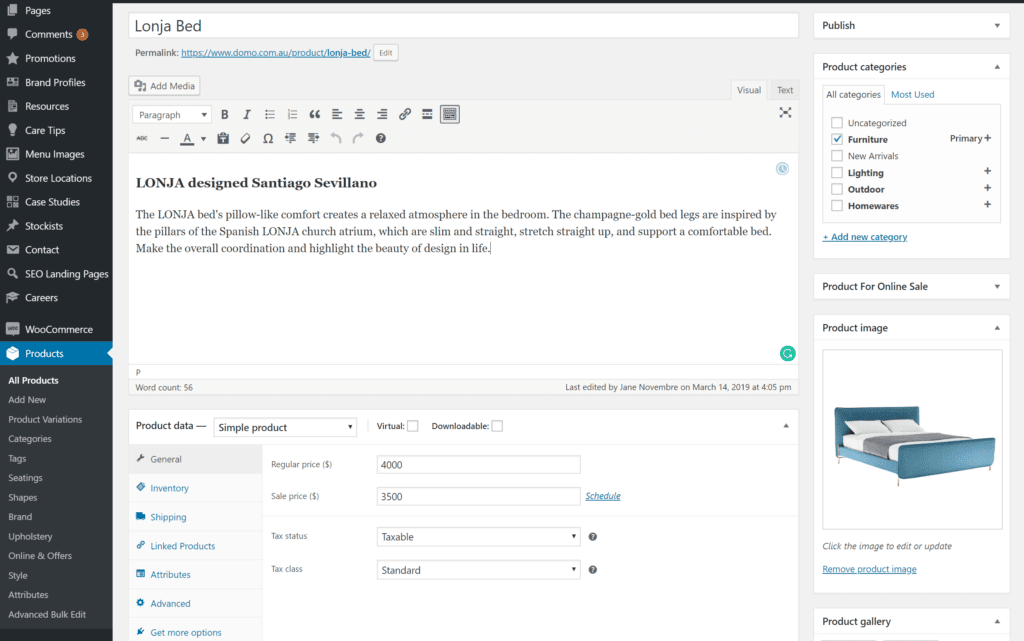
WooCommerce CMS
Having all this information in your CMS will not only give you a handy overview of everything but will also ensure that the information is organised on your website. Depending on your theme or stylesheet, the website will pull this information out of the CMS in order to display this in an orderly way to your customer. In addition, you can create product categories and subcategories based on what you attributed in the CMS.
A CMS is what you use ‘behind the scenes’ to organise the products and content on your website. But from the user’s perspective too, it can be challenging to find your way through the complexity of an online store. That’s why we have to ensure product filters and attributes that will help us categorise everything – on both ends.
Product filters are an essential part of improving a customer’s experience in your store. It will give them the option to quickly refine a large product range to find exactly what they’re looking for. Filtering the products also gives them the option to manipulate the content, increasing the personal experience they will have.
So what filters should you include on your ecommerce store? The answer to this highly depends on the products that you’re offering. Examples of filters that are available in most ecommerce stores are the price range and the brand, but when you think of clothing, for example, you’ll quickly associate filters as size, colour and fit.
Like we already mentioned, these filter categories are established as attributes in the CMS. It’s here that you enter the size and the colour, and that data is used to pull up the right results when somebody filters your products. But how do these filters function on your website itself? Filters usually appear on the left-hand side of your product page and can be displayed as checkboxes, links or tabs. Users normally get the option to select various options, and sometimes they’ll see little tags of the applied filters on the top of their screen.

Product filters in online clothing store Cotton On
In addition to filters, most online stores also offer a search function in their webshop, allowing users to quickly find the right product. The ecommerce site search is usually a search box that is big enough for typical queries, found on top of the website’s page. Since users using the site search are more likely to convert (searching for a specific terms means they’re already further in the buying cycle), it’s important to install a well-working site search on your ecommerce site.
Our webshop is taking more shape now we’ve included our products, content and filters. Now, it’s time to connect everything through internal links. Internal links are not only important for your SEO (more on this later) but are also necessary to keep your visitors on your website. It gives users the possibility to browse through your website and go from one page to another, which will ideally lead to conversions.
The most important internal linking structure is set up when we decide on our site structure and create our navigation menus. By doing this, we organise our content into categories that are more or less important and we tuck our subcategories away underneath the bigger ones. By doing this you will make your more important categories better approachable to your users and you will show the Google bots which pages have more relevance.
In addition to your site structure, it’s also important to include internal links between other pages on your website. Links can go from one product page to another, from a subcategory to a blog post or from a blog post to a contact form. Linking from one product page to another is mostly done by features as ‘Related products’, which will send your customers to other items they might be interested in. Linking to a blog post is something you can do when you write a tutorial or an educational article on one of your products or categories.
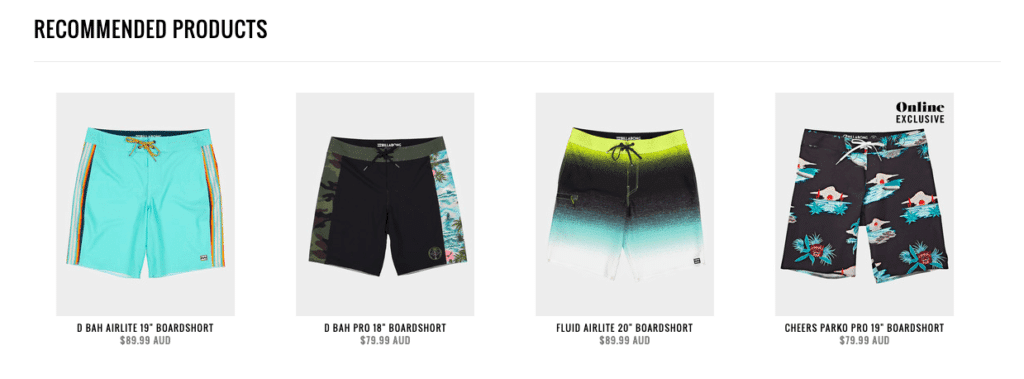
Recommended products show up under the product you’re viewing in the Billabong shop
When you think about an internal linking strategy for your ecommerce business it’s important to keep in mind that you’re creating the internal links in the first place for your customers. Keep the links natural and relevant and don’t try to focus on SEO only.
Now we’ve reached the topic of SEO, it’s time to zoom in on our website optimisation for the search engines. Since we cover most of the on-page and off-page in our complete SEO guide, we will only talk about SEO aspects that are important for ecommerce web development.
We talked about ecommerce structures and internal linking, but it’s important for your SEO that you provide a complete inventory of your website so the bots can crawl it easily. By creating a sitemap you will help them find your pages and you can upload this in the Google Search Console. Furthermore, it’s also necessary that this structure is reflected in the URL – displaying your categories and subcategories clearly.
Another important aspect of SEO is the optimisation of your tags, so it’s important to verify your title and heading tags. E-commerce stores usually work with a template for their meta tags with a pattern that is easily recognisable in the search results. By using shortcodes that automatically pull up the category names you can avoid having to go through all your product pages and insert meta titles manually.
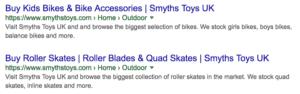
Source: Ahrefs
Great for your SEO is also Schema Markup. It will help customers click on your result compared to your competitors because it provides them with more relevant information.
What would you rather click on?
This?

Or this?

There are a lot of properties to add to the schema property but here are the ones you should add to the product pages.
Last but not least, we should focus on technical SEO issues when developing an ecommerce website. Think about avoiding duplicate content (and thus not having two identical pages on your website) and keyword cannibalization errors where you let multiple pages rank for the same keywords, so they compete with each other.
In addition to the basic features WooCommerce offers, there are probably a lot of integrations you would like to consider in order to adapt your online store to your exact needs. We’ll go over a couple of integrations you can’t miss for your ecommerce store, and we’ll start with social media.
We know it’s all happening on social media, so don’t forget the importance of these channels for your ecommerce store too. Focusing on social media will be one of the best ways for you to attract new customers, but we’ll talk about ecommerce and social media marketing later on.
At this point, we want to point out the things you should include in your ecommerce web development in order for your social media and website to be integrated. Of course, it’s important to provide a link from your store to your social media pages, and this is usually done by including the social media icons in the footer of your website.

There are however a couple of other ways for integrating your online store with your social media channels.
A first thing you want to include on your website is social sharing buttons. These buttons give customers the chance to share a page or product of your website with their followers. Modern customers have stronger relationships with the brand they support and will be more inclined to share their opinion with the world.
Including social buttons is best done on the separate product pages, so your customers can easily share their favourite items. It’s important to adapt the social sharing buttons to fit on your page without interrupting with the buying process, and we would recommend creating new icons that differ from the ones you used on your home page. Also, think about what channels you connect here. When it comes to online shopping, Facebook and Pinterest would probably be interesting, LinkedIn is probably better to leave out.
A second connection with social media should be made through social sign-ins. When a customer wants to buy something on your website, they will have to create an account in order to keep track of their purchasing history, saved items and shipping updates. But instead of having them to fill out a lengthy form, you can offer them the option to sign in through one of the social media channels they’re already active on.
But there’s more. In order to attract more customers through your social media, you can integrate your entire online store with Facebook. WooCommerce has a handy plugin that will connect the two, but let’s see what this can be used for.
First of all, there’s your Facebook store, where your products can be viewed on Facebook. Your products will be automatically imported into your Facebook store, with details such as prices and images included. Customers will either be able to buy it on Facebook or they have to click through to your website to complete the check-out process.
Once you have your products in your Facebook store, you can tag products in your Facebook posts. Customers will then see the products shown in your picture or video and immediately see all the details. Integrating your Facebook store with your WooCommerce store will furthermore give you the option to create Dynamic Product Ads on Facebook or retargeting ads to people who’ve visited a certain page or viewed a certain item on your shop.
There’s also an Instagram integration possible for your online store. Similar to Facebook, you can upload your products into your social media store which gives you the option to tag the products you’re showing on your Instagram posts. Customers can then just click on the item in order to purchase it in your store.
Another integration you can’t skip is connecting your online store with an email service. Emails will be an important part of your selling process, whether it’s to send an order confirmation, shipping updates, abandoned shopping cart reminders or newsletters.
A first step is to choose an email marketing platform. Examples of good email platforms include Mailchimp, Mailster or OptinMonster. Within your email marketing platform, you can create the emails you want to send out when certain actions are taken on your website. The tools often give you the option to do this entirely in your house style so you can include important branding elements.
By connecting your email platform and your ecommerce store, you can make sure that emails will automatically be sent when triggered by a certain action. Examples are completing a purchase, sending a reminder or just sending a welcome email when they sign up for your mailing list.
Unless you’re planning not to make any money with your store, a payment gateway integration is a necessary thing to include in your webshop. A payment gateway is an ecommerce service that processes credit card payments where key information is being transferred between your payment portals. Since there’s money involved, this should, be safe and encrypted information – so your customers can safely spend their money.
Examples of safe payment gateway integrations are PayPal, Square and Stripe (they accept master cards and visa cards). When deciding upon the right integrations for your store you should look at the processing speed, user-friendliness and transactional fees that might be included (especially when dealing with international customers).
When you have an established ecommerce store, you want to know how it’s performing. That’s why you need to connect your online shop with an analytics tool, so you can keep track of what’s working and what’s not.
Having all the important data available will give you a good idea of how your website is performing, where your customers are coming from and how they’re behaving on your website. There are various tools available that will all give you different insights regarding the demographics of your customers or their user interaction with your website. Here’s a list of some top tools we’d recommend:
Once you’ve sold an item on your website, you should make sure it gets to your customer. When you just launched an ecommerce store, chances are high you will be taking care of the shipping process yourself. This means you have to process the order yourself, pack it, label it and send it.
Once you’ve been able to grow your business, you might want to consider automating this process. There are various integrations possible for your ecommerce store. Examples include Transdirect, Australia Post Shipping Method or TNT Express plugin. By using one of these tools, the work of calculating shipping costs and adding additional costs will be taken over by the integration.
If you work with a drop shipping delivery method, the shipping process will, of course, be different. When you work with WooCommerce Dropshipping, the order confirmation will be sent automatically to your wholesaler. Your partner will then take care of the actual shipping. Of course, giving this process out of hand also means there’s more room for mistakes. Make sure your integrations work seamlessly in order to avoid customers’ complaints.
When you’re selling products online, you’re going to have to find new ways to engage your customers. A good way of doing this is by offering promotions and discounts on your online goods. Promotions and discounts can happen in many ways:
Whatever discount you decide to offer, your webshop should be able to process this. You should either show the discounted rate on your product page or have the option for customers to apply a discount code in the check-out process, without it being a big hassle for you. A lot of discount tools and integrations will help you to make this process a lot easier.
One last thing we want to discuss when it comes to ecommerce web development is the expansion of your website. No matter what ecommerce platform you decided to go with, what your design is or how many integrations you connected – you always need to keep an eye on your future expansion plans.
The most important aspect of your ecommerce store that should be scalable is your database. Your database contains all the data of your products and customers and should thus be able to grow with your business. This means the structure of your database should be able to handle the load, whether that structure is cloud-based or spread out over several servers. In addition, enabling indexing and intelligent caching can help handle high-frequency transactions.

We’ve covered some of the main aspects you want to think about when dealing with ecommerce web development. But a successful ecommerce store doesn’t just depend on strong web development. In this last chapter, we’d like to shine a light on some other aspects that come into the picture when you’re launching your first ecommerce business.
A web host is a business that provides the service and technologies needed for a website to be viewed online. Your hosting is a virtual space where you save all the data and files that are on your website. Important with website hosting is that it allows you to have a fast website that is secure and that they offer the necessary support.
The hosting of an ecommerce website isn’t much different than other websites, but there are a couple of things you should keep in mind when deciding on your hosting platform. First of all, you might be dealing with a lot of data. Extensive product catalogues with high-quality pictures should be saved on a hosting platform that can handle this amount without it getting slowed down. Secondly, you need to consider how much traffic you’ll get and if your hosting server will be able to deal with this. You wouldn’t be the first website to crash after a TV commercial sends thousands of new visitors to the website all at once.
Another thing to consider is its safety and security features. Do they offer Secure Sockets Layer (SSL) certificates or do they have a backup functionality in place so your data won’t get lost? One last thing to keep in mind is their support service for if something goes wrong. Is there 24/7 assistance available?
We only talked about the web development of an ecommerce store until now. However, you will also need a store that looks pretty and functions well. That’s where your web design comes in. Your web design should focus on a user-friendly design, that organises the information in ways that are easy to navigate for your users.
Web design is necessary when you get all the information out of the CMS, in order to give it shape on your actual pages. This means you’ll be defining the size of the images, the colours of the buttons, the number of columns you’ll use to display your products etc. These little details might only seem important for the aesthetic aspect of your website, but they can actually enhance the user experience if done well.
The User Experience (UX) in ecommerce plays a vital role. Simple and clear interaction components, attractive product presentation, easy check-out processes and effective use of visual elements can all influence the profits you’re making with your ecommerce store.
In the case of ecommerce there are four key aspects of UX that are quite clear:
Applying the principles of good UX to your website is necessary if you want to offer your users a good experience. We wrote a whole guide about UX with tips on how to improve your website.
So you build a beautiful shop online, but without marketing, you might as well have set up a store in the middle of the woods somewhere. You need people to find your store and that’s where a good marketing strategy comes in.
There are many aspects of your ecommerce marketing. First of all, your SEO should be on point so you can improve your rankings in the search results. But next to your search engine marketing, you should also consider other channels to reach your customers.
Social media, for example, is an important medium for your marketing. Platforms such as Facebook and Instagram give you the chance to build personal relationships with your customers. They are the ideal channel to focus on both the promotional aspect and your brand image.
Also, email marketing isn’t dead. Sending out newsletters with product updates, new collections or sales will bring your brand to the top of your audience’s mind. Emails are also a great way of getting more engagement since call-to-action buttons usually send your users straight to your landing pages.
Finally, there’s paid advertisement which can be done on either social media or Google. Google Adwords will give you the option to place ads in the search results. With search ads, you can reach people that are already searching for products like yours and thus more likely to convert. Display ads and YouTube ads, on the other hand, are a perfect way to introduce your brand to new customers. Retargeting ads are the best way to find people who’ve already been to your website but need a little reminder. Google Shopping ads are key for businesses that want their products to show up within the first results.
On Facebook, you can choose between different types of campaigns. These can be focused on either increasing brand awareness, getting new page likes or attracting new visitors to your website. Especially interesting for ecommerce stores are the conversion-focused campaigns because they focus on driving you sales.
Setting up an ecommerce store involves a lot more than just the development of a website. By hiring a full-service agency, you are sure you have a full team behind your business, that can help you with tasks ranging from hosting a website to branding your store. Don’t miss out on any customers because of bad UX or the lack of a marketing strategy, but get an expert to help you out!
Talk to us about your ecommerce adventure and we’ll be happy to show you how we can help.
There are a lot of platforms available for the development of your ecommerce store. Examples include Shopify, Magento, WooCommerce and BigCommerce. All of these online-shop builders have their own advantages and disadvantages. Here at Fox and Lee, we refuse to use anything else than WooCommerce – and trust us, we have our reasons. We’re happy to share the benefits of WooCommerce compared to other platforms with you.
Let’s start with a quick reminder. WooCommerce is the free WordPress plugin that adds ecommerce functionality to your website. Even though it’s ‘just another WordPress plugin’, it’s unbeatable in its functionalities and potential. The more than 4 million active installations speak for itself. WooCommerce integrates seamlessly with WordPress and gives you access to hundreds of free and premium extensions.
Now, what are the benefits of WooCommerce?
First of all, WooCommerce is a highly flexible product. It offers you a lot of options when it comes to your products, where you can tailor your own product categories and attributes so you can build a shop that exactly fits your brand. You can sell whatever product you’d like, whether these are physical objects, appointments or downloadable files.
WooCommerce also has the great benefit of being not just an ecommerce platform. Since it integrates with WordPress, you have the opportunity to integrate your shop with a professional custom website or even include a blog for your SEO and content strategy. Because it’s all accessible within the same interface, it’s easy for you to make adjustments while still keeping your brand identity intact.
One of our favourite aspects of WooCommerce is that is highly customisable. And with that, we mean that you can change almost everything. Except for the ready-to-use templates, WooCommerce gives you the chance to choose your own colours, sizes and tweak the code until it exactly matches with your brand image. As professional web designers, we love to bring out our creative side and WooCommerce never comes short.
When you choose an ecommerce application, it’s necessary to keep the future plans of your business in mind. You might only need a couple of product categories and pages now but you might be expanding your product catalogue sooner than you think. WooCommerce is able to scale from a couple of products to an immense online store. Plus, they are not only capable of handling a large number of products but they can also deal with thousands of shoppers per second.
There is no point in running an online store if you don’t know how it’s performing. And to know this, you need data. WooCommerce itself offers you an extensive set of analytics in a clear and organised way. If you need to know more, there are a lot of integrations on the market that make it possible to connect your store with analytical tools, such as Google Analytics for example.
Lastly, you need a store that is safe. Since WooCommerce is regularly updated, you don’t need to worry about any security issues and you won’t be experiencing too many bugs. Updates are easy to install and don’t require much technical knowledge. WooCommerce monitors the codes and checks for vulnerability so you know your website is safe. And since it’s an open-source website, there’s a huge community of developers available that can also offer valuable tips.
Convinced? Let’s start building a beautiful WooCommerce website. Contact us today and we’ll help you out.



